
Know what to reorder, how much, and when, before best sellers run out
SellerPilot shows each product's days of cover at its current sales speed, the reorder quantity for your lead time and cover days, inbound stock, and stranded, aged and overstocked units. FBA shipment plans are rounded to case packs, with a file to paste into Send to Amazon, and ads pause when stock runs out.
Days of cover, reorder quantities for your lead time, and FBA shipment plans rounded to case packs.
- Days of cover from real sales speed
- Reorder quantity for your lead time and cover days
- FBA shipment plans in case packs
- Stranded, aged and overstocked units flagged
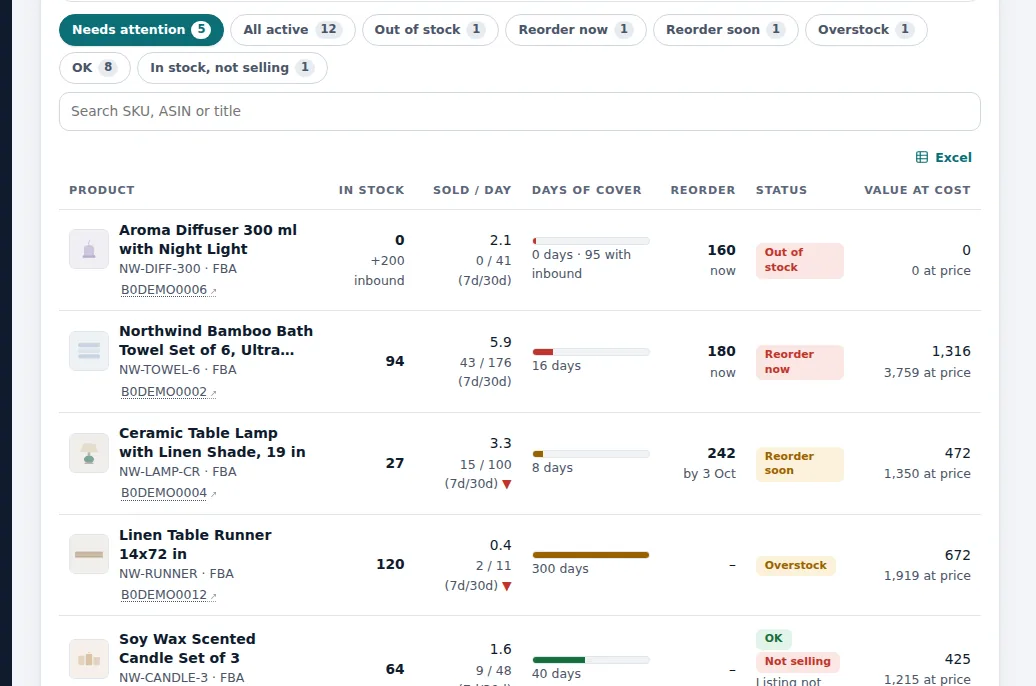
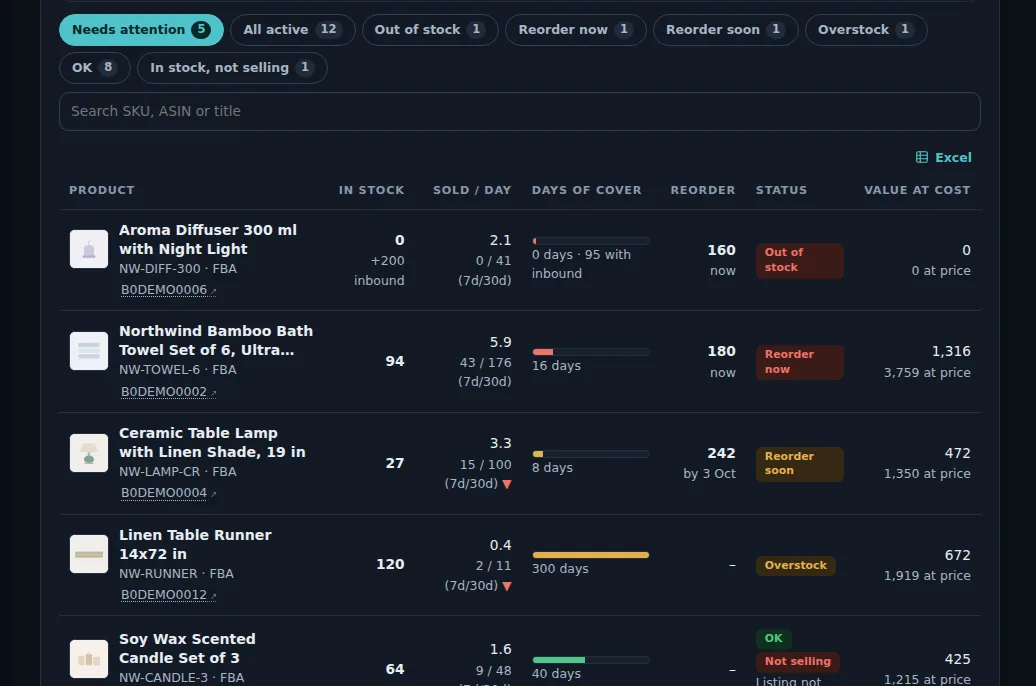
Demo store with sample data.
How it works
Stock loads every hour
FBA and merchant stock, inbound shipments and sales speed come from Amazon's inventory and order reports.
Set your planning numbers
Lead time (days from order to stock at Amazon), cover days (how long a delivery should last) and the overstock threshold.
See what to reorder
Reorder now, no sales, stranded and inactive views; reorder quantity per product for your lead time and cover days.
Plan the FBA shipment
Units to send per product so stock lasts through the lead time and your cover days, rounded to case packs, with an optional total-unit cap and a file to paste into Send to Amazon.
Ads follow the stock
Ads for products that run out pause by themselves and resume when stock is back; budgets drop when stock will not last until the next delivery.
When to reorder the towels
A towel set sells 14 units a day. 420 units are at Amazon and 200 are inbound: 620 units, about 44 days of cover.
The supplier needs 30 days and shipping to Amazon another 15: a 45-day lead time. With 30 cover days wanted after a delivery, the reorder quantity is 14 × (45 + 30) = 1,050 units minus the 620 on hand and inbound = 430 units, rounded up to 432 with a case pack of 24.
SellerPilot flags the product as Reorder now, and the FBA shipment plan lists 18 boxes of 24, with a file to paste into Send to Amazon.
Illustrative numbers, not a customer result.
How the reorder quantity is worked out
Reorder point = daily sales × lead time, plus safety stock. When stock (including inbound) falls to the reorder point, it is time to order. The quantity to order covers the lead time plus the cover days you want a delivery to last, minus what you already have and what is on the way.
Using the current sales speed matters: a product that doubled its sales last month runs out twice as fast as last quarter's average suggests. SellerPilot uses recent sales, so the reorder date moves when demand moves.
What the inventory view includes
- Days of cover and reorder quantity per product
- Inbound units already on the way
- Stranded units (in stock but not for sale)
- Aged and overstocked units
- Stock value at cost
- Best sellers running out in the morning alert
What it does not do
Stated plainly, so you know before you start.
- It does not create FBA shipments on Amazon: you paste the file into Send to Amazon
- It does not place purchase orders with your supplier
- Sales speed cannot foresee a sudden spike; sale events you set are taken into account by the ads, not the forecast
Questions sellers ask
How do I know when to reorder on Amazon?
What is days of cover?
Does SellerPilot work for FBM stock?
What are stranded units?
Can SellerPilot plan shipments by case pack?
Related features
Profit analytics
Profit per order and per product after every Amazon fee, ad cost and your product cost.
Learn morePPC autopilot
An autopilot for bids, budgets, negatives and harvesting that never goes past your limits.
Learn moreReimbursements and returns
Return rates with Amazon's reasons, refunds still pending, and units Amazon lost or damaged and still owes you.
Learn moreDeals tracker
Whether each deal badge, coupon and strike-through price really shows, and why not.
Learn moreTry SellerPilot on your own store
Connect Amazon in about five minutes. Your first data arrives within hours and your first suggestions the next morning.