
New Amazon campaigns in a guided wizard, previewed before anything is created
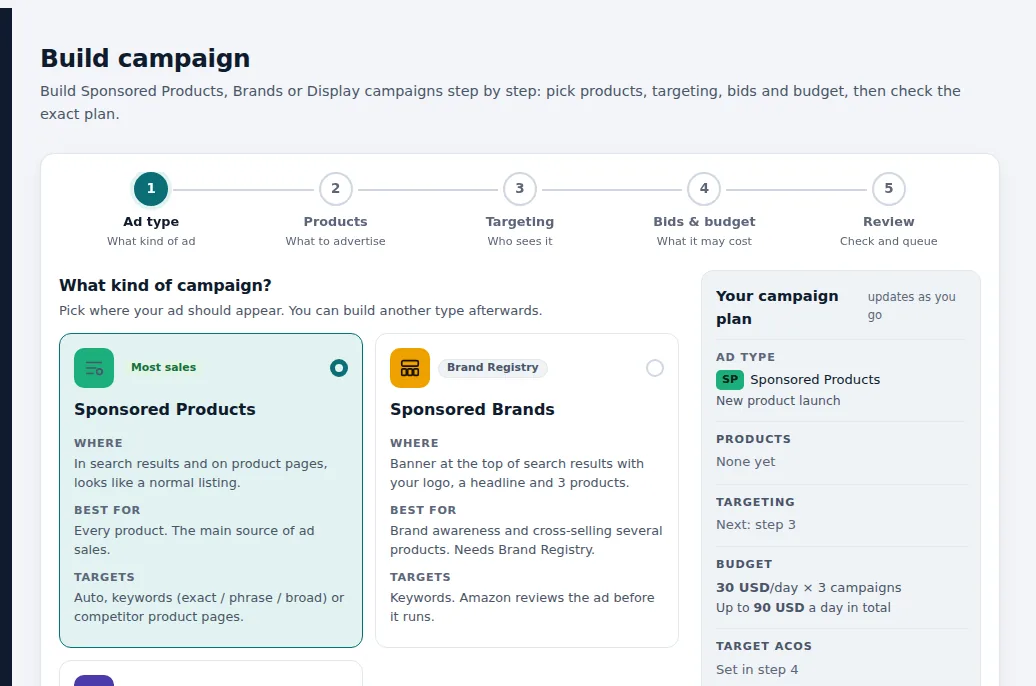
Build Sponsored Products, Sponsored Brands or Sponsored Display campaigns in five steps: ad type, products, targeting, bids and budget, review. Pick products with their pictures, stock and margin; SellerPilot proposes the structure, keywords, bids from break-even ACOS and a budget within your daily cap, and shows the exact plan before anything is created on Amazon.
New campaigns in a guided wizard: products, structure, keywords, bids and a budget within your cap.
- Auto, keyword, product and harvest campaigns
- Rank push: one campaign per hero keyword
- Liquidation campaigns for overstock
- Copy a working campaign to another marketplace
Demo store with sample data.
How it works
Ad type
Sponsored Products for every product, Sponsored Brands (needs Brand Registry) for a banner with your logo and three products, or Sponsored Display.
Products
Choose the products to advertise; their pictures, stock and margin are shown so you advertise what can sell profitably.
Targeting
Auto, keywords in exact, phrase or broad match, or competitor and complementary product pages.
Bids and budget
Bids from each product's break-even ACOS and a daily budget that fits your account-wide cap; the plan shows the total a day.
Review
Check the exact plan: every campaign, ad group, keyword and bid, then queue it. Campaigns appear on Amazon and in the change log.
Launching a new product
A seller launches a ceramic table lamp that sells for $59 and leaves $21 before ads: a break-even ACOS of about 36%.
In the builder they pick Sponsored Products, the lamp, and the Launch goal. SellerPilot proposes an auto campaign to discover searches, an exact keyword campaign for three lamp keywords, and a product targeting campaign on two complementary lamp shades, with starting bids the product can afford and a $30 daily budget each, $90 in total, inside the account cap.
They review the exact plan, remove one keyword, and queue it. Three campaigns named AP | Ceramic lamp | AUTO, KW and PAT appear on Amazon and in the change log.
Illustrative numbers, not a customer result.
A structure that stays clean
Messy structure is the most common reason Amazon PPC accounts get hard to manage: the same keyword in several campaigns, broad and exact competing, and campaign names that say nothing. The builder names every campaign by product and type (for example AP | Bath towels | KW), keeps exact keywords out of phrase, broad and auto campaigns, and starts every keyword at a bid the product can afford.
Campaign types
- Auto campaigns to discover searches
- Keyword campaigns in exact, phrase or broad match
- Product targeting campaigns on competitor or complementary ASINs
- Harvest campaigns for search terms that already sell
- Rank push: one campaign per hero keyword
- Liquidation campaigns that move overstock
What it does not do
Stated plainly, so you know before you start.
- It does not create anything before you see the preview and press create
- It does not set a budget past your account-wide daily cap
- It does not design Sponsored Brands creatives; Amazon reviews Sponsored Brands ads before they run
Questions sellers ask
How should I structure Amazon PPC campaigns?
How are starting bids set?
Can I copy a campaign to another marketplace?
Does it work for new products with no sales?
Related features
PPC autopilot
An autopilot for bids, budgets, negatives and harvesting that never goes past your limits.
Learn moreBid optimization
Bid and budget changes every morning, each with the clicks, spend, orders and ACOS behind it.
Learn moreSearch term harvesting
Negative keywords for searches that never sell, and winners harvested into exact-match campaigns.
Learn moreKeyword research
The searches any product wins, from Amazon's Brand Analytics, with click and purchase share.
Learn moreTry SellerPilot on your own store
Connect Amazon in about five minutes. Your first data arrives within hours and your first suggestions the next morning.